 Daniel Okoye
Mobile banking has become a major part of everyday financial life in Nigeria. From transferring money to paying bills and checking balances, millions of transactions happen daily through mobile banking apps and USSD codes. Yet, many users do not really understand what happens behind the scenes once they press the “send” or “confirm” button. Understanding how mobile banking transactions are processed helps reduce panic during delays, failed transactions, or reversals.
What Is a Mobile Banking Transaction?
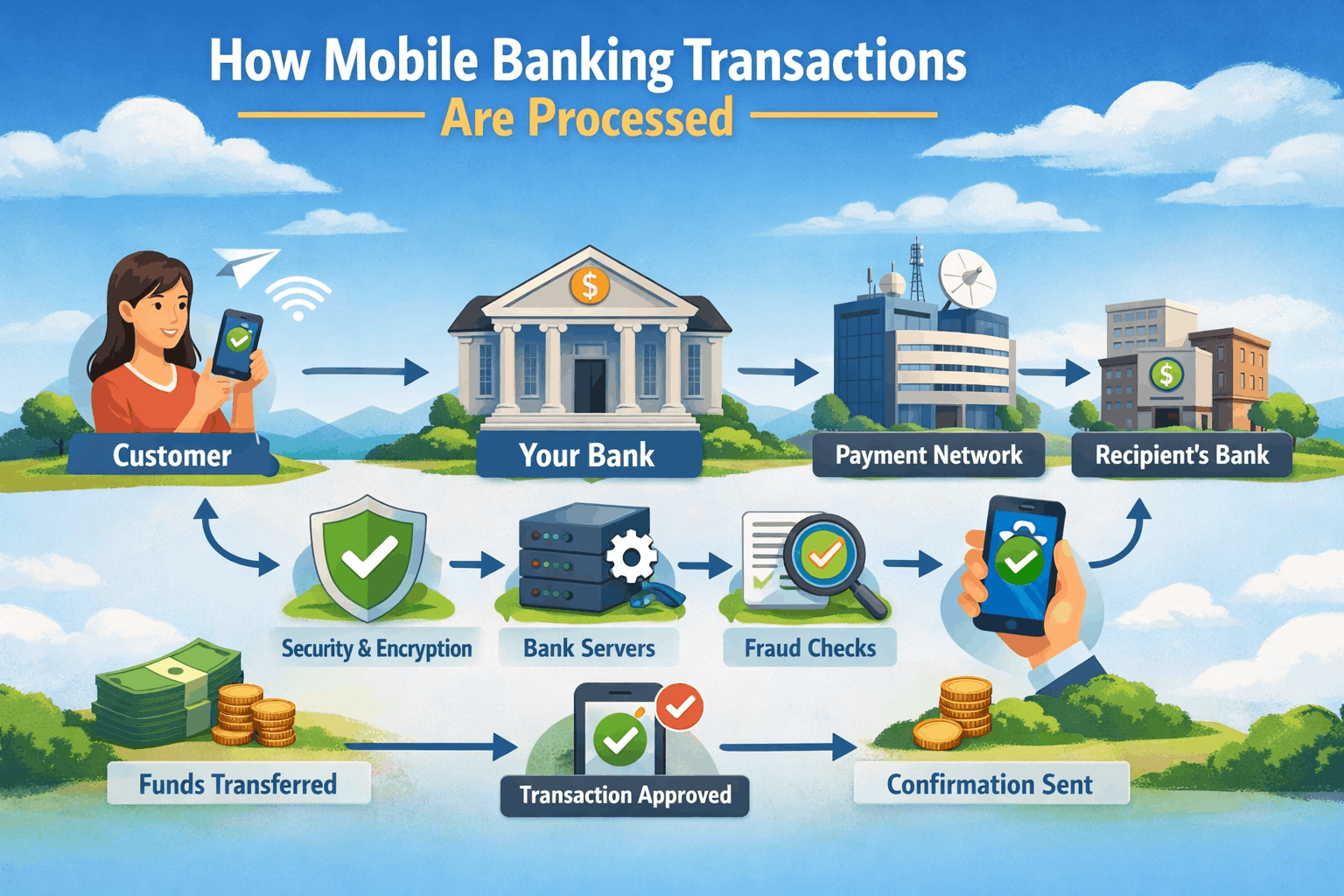
A mobile banking transaction is any financial action carried out through a bank’s mobile app or USSD platform. This includes money transfers, airtime purchases, bill payments, balance checks, and cardless withdrawals. Although it feels instant to the user, each transaction passes through several systems before it is completed.
Step One: Transaction Initiation
The process starts when a user initiates a transaction. This could be by entering a transfer amount on a mobile app or dialing a USSD code. At this stage, the bank’s system captures important details such as the sender’s account number, the recipient’s account details, the transaction amount, and the transaction type.
The system also checks whether the user has an active session and whether the request is coming from a recognized device or network. This step is important for preventing unauthorized access.
Step Two: User Authentication and Security Checks
Before any money moves, the bank must confirm that the transaction is truly authorized by the account holder. This is done through authentication methods such as PINs, passwords, biometric verification, or one-time passwords (OTPs).
At the same time, the system runs background security checks. These checks look for unusual behavior, such as transactions that are much higher than normal or attempts from unfamiliar locations. If the system detects a potential risk, the transaction may be delayed, flagged, or declined.
Step Three: Balance Verification
Once authentication is successful, the bank’s system checks the sender’s account balance. This ensures that there are sufficient funds to cover the transaction amount, including any applicable charges.
If the balance is not enough, the transaction is immediately declined, and the user receives a notification. If the balance is sufficient, the system temporarily places a hold on the amount to prevent double spending while the transaction is being processed.
Step Four: Routing the Transaction
After balance verification, the transaction is routed to the appropriate payment channel. For transfers within the same bank, the transaction is handled internally by the bank’s core banking system. These are often faster because they do not require external systems.
For interbank transfers, the transaction is sent through national payment platforms such as NIBSS in Nigeria. This platform acts as a central switch, connecting different banks and ensuring that funds move securely from one institution to another.
Step Five: Processing by Payment Switches
Payment switches are systems that route transactions between banks, mobile networks, and financial institutions. When a transaction reaches the switch, it is validated again to confirm that all details are correct and that the receiving bank is available to accept the transaction.
At this stage, delays can occur due to network congestion, system maintenance, or temporary downtime at either the sending or receiving bank. This is why some transactions may appear as “pending” even though the money has been deducted from the sender’s account.
Step Six: Credit to the Recipient
Once the receiving bank confirms the transaction, the recipient’s account is credited. For successful transactions, this happens almost immediately. The receiving bank then sends a confirmation back through the payment switch to the sender’s bank.
Both the sender and the recipient may receive alerts depending on their bank’s notification settings. At this point, the transaction is considered complete.
Step Seven: Transaction Confirmation and Record Keeping
After completion, the transaction details are recorded in multiple systems. The bank updates the user’s transaction history, and the payment platform logs the transaction for reconciliation purposes.
These records are important for resolving disputes, handling reversals, and meeting regulatory requirements. Even failed or reversed transactions are logged to maintain a clear audit trail.
Why Some Transactions Fail or Get Delayed
Transaction failures or delays are common in mobile banking and usually result from technical issues rather than fraud. Common reasons include network instability, downtime on payment switches, incorrect recipient details, or system upgrades.
In some cases, money may be deducted but not credited to the recipient immediately. When this happens, the transaction enters a reconciliation process where the payment platform verifies the status and initiates a reversal if necessary.
How Reversals Are Handled
Reversals occur when a transaction cannot be completed successfully. The system checks transaction logs to confirm whether the recipient bank received the funds. If the transaction failed midway, the held amount is released back to the sender’s account.
Reversals may happen automatically within a few minutes or take several hours or days, depending on the nature of the failure and the banks involved. This is why banks often advise customers to wait before filing complaints.
The Role of Regulations and Monitoring
Mobile banking transactions are monitored by regulatory bodies to ensure security and transparency. Banks are required to follow strict guidelines on transaction limits, reporting, and customer protection.
Monitoring systems also help detect fraud, money laundering, and other suspicious activities. While this may sometimes slow down transactions, it helps protect users and maintain trust in the banking system.27ahyt
What Users Should Know
Understanding how mobile banking transactions are processed helps users remain calm during delays and make better decisions. Always double-check recipient details, keep transaction records, and avoid repeated attempts when a transaction is pending. Most issues are resolved through automated systems, even if they take some time.
Mobile banking may feel instant, but behind every transaction is a carefully coordinated process designed to ensure security, accuracy, and accountability.

Daniel Okoye
Daniel Okoye is a writer and researcher at ProcesslyHub. I focus on explaining Nigerian systems, housing processes, and everyday business workflows in simple and practical terms. My goal is to help readers understand how real-world processes work so they can make informed decisions and avoid costly mistakes.
 Daniel Okoye